

Indicator for TradingView
Merlin Scalping
Smart buy and sell signals for gold traders.
Trade gold with a plan, using BUY and SELL signals and a dashboard that's easy to read.
- Platform
- TradingView
- Market
- Gold (XAUUSD)
- Timeframes
- M5 and M15
- Trading style
- Scalping and short-term trading
- Access
- Invite-only indicator
- Membership
- Starter Access ($100)
Everything you need, on one chart.
Signals, levels, trend and alerts, all from one indicator on TradingView.
- 01
Buy and sell signals
BUY and SELL signals appear on the candlestick chart with the signal price, so you can see each point the system picks out.
- 02
Smart trading dashboard
The trend, the latest signal, entry price, stop loss, take-profit targets and past signal statistics sit together in one panel.
- 03
Automatic entry, SL and TP levels
Levels follow the system's rules: TP1 at 300 points, TP2 at 600 points and the stop loss at 900 points.
- 04
Market trend analysis
The dashboard shows UPTREND or DOWNTREND to help you judge the market's direction.
- 05
Win and loss history
The dashboard counts past signals that met its WIN or LOSS condition on the timeframe you're using. A signal counts as a WIN when price reaches TP1 before the stop loss.
- 06
TradingView mobile alerts
Get BUY and SELL alerts on your phone through TradingView, with the entry, SL, TP1 and TP2 prices.
The real indicator, on a real chart.
A screenshot of Merlin Scalping on a gold 5-minute chart in TradingView. Here's what each part tells you.
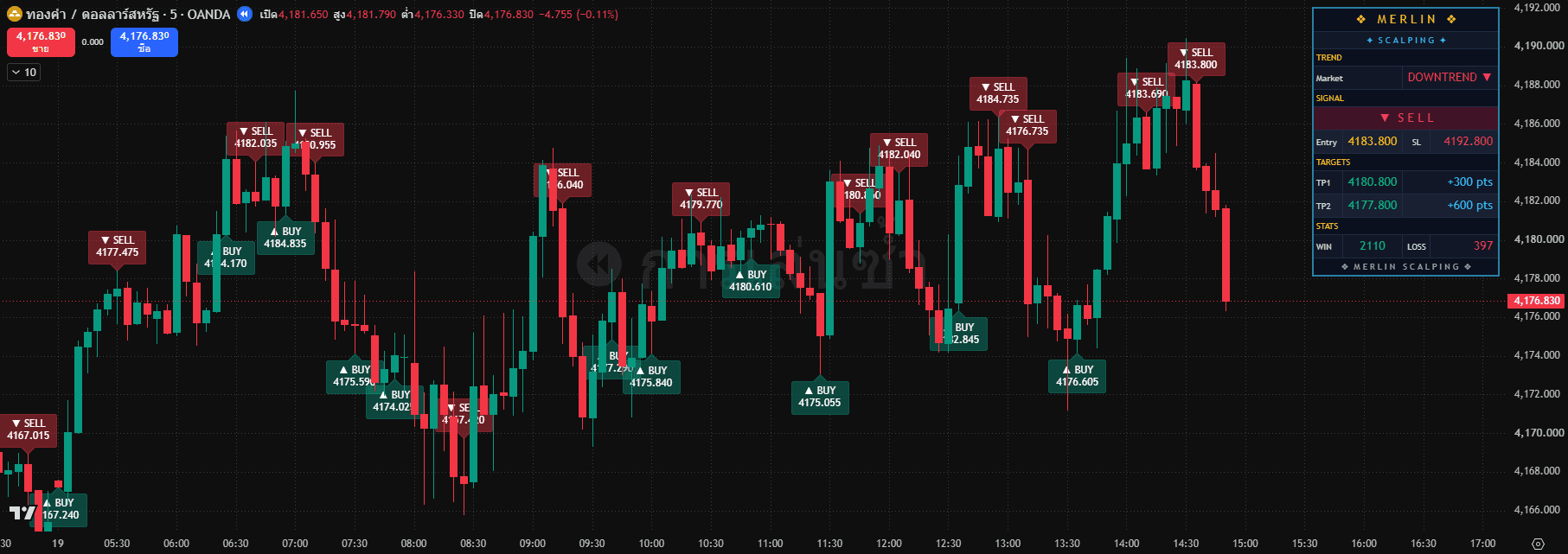
BUY and SELL tags
Each signal is marked on the candle with its direction and the price it fired at.
Trend
The dashboard reads the market as UPTREND or DOWNTREND.
The latest signal
Here it's a SELL at 4,183.80, with the stop loss at 4,192.80.
Targets
TP1 at 300 points and TP2 at 600 points, set automatically with the signal.
Win and loss count
The dashboard keeps count of past signals on your timeframe. A WIN is counted when price reaches TP1 before the stop loss.
Every signal comes with a plan.
Entry, stop loss and two targets are set the moment a signal fires. Here's a real BUY from the dashboard, drawn to scale.
- TP1 · 300 points
- The first target, a $3.00 move in the gold price.
- TP2 · 600 points
- The second target, a $6.00 move, for when the trend keeps going.
- Stop loss · 900 points
- Set with every signal, so you know your exit before you enter.
Get Merlin Scalping with Starter Access.
One membership unlocks the indicator, both signal rooms and the community. Here's how to join.
Starter Access
$100deposit
Into your own FPG trading account. It isn't a fee.
Included
- Merlin Scalping indicator
- Gold signal room
- Forex signal room
- Telegram Trading Plan room
- LINE OpenChat community
Deposits add up. Reach $200 to add EA-01: M1 Sniper by Elites Pro.
- 1
Message us on LINE
Contact Avanyx through the LINE Official Account.
- 2
Open an FPG account
Use the link our team sends you.
- 3
Deposit $100
Deposit at least $100 in total into your new account.
- 4
Send your TradingView username
The admin checks your eligibility and asks for your username.
- 5
Get your invite
Wait for invite-only access to be switched on for your username.
- 6
Add it to your chart
Find Merlin Scalping in TradingView and start learning how it works.
Membership runs in 3-month rounds and renews when you make at least one verified trade in the round.
Which platform does Merlin Scalping run on?
TradingView, on a computer or in the mobile app, once your invite-only access is switched on.
What is it best suited to?
The developer's guide recommends gold (XAUUSD) on the M5 and M15 timeframes, for short-term trading.
Does the indicator place trades for me?
No. It isn't an EA. It shows signals and information to help you plan, and it doesn't send orders from TradingView to MT5.
Can I get alerts on my phone?
Yes. Set up a TradingView alert and turn on Notify on App, as the guide shows. What works depends on the limits of your TradingView plan.
I have access, so why can't I find the indicator?
Check that you're signed in with the TradingView username the admin gave access to. Open Indicators, then Invite-only scripts, and refresh the page or reopen the app.
Do the WIN and LOSS numbers mean real profit?
No. They count past signal results by the indicator's own rules. They leave out trading costs and what actually happened in anyone's account.